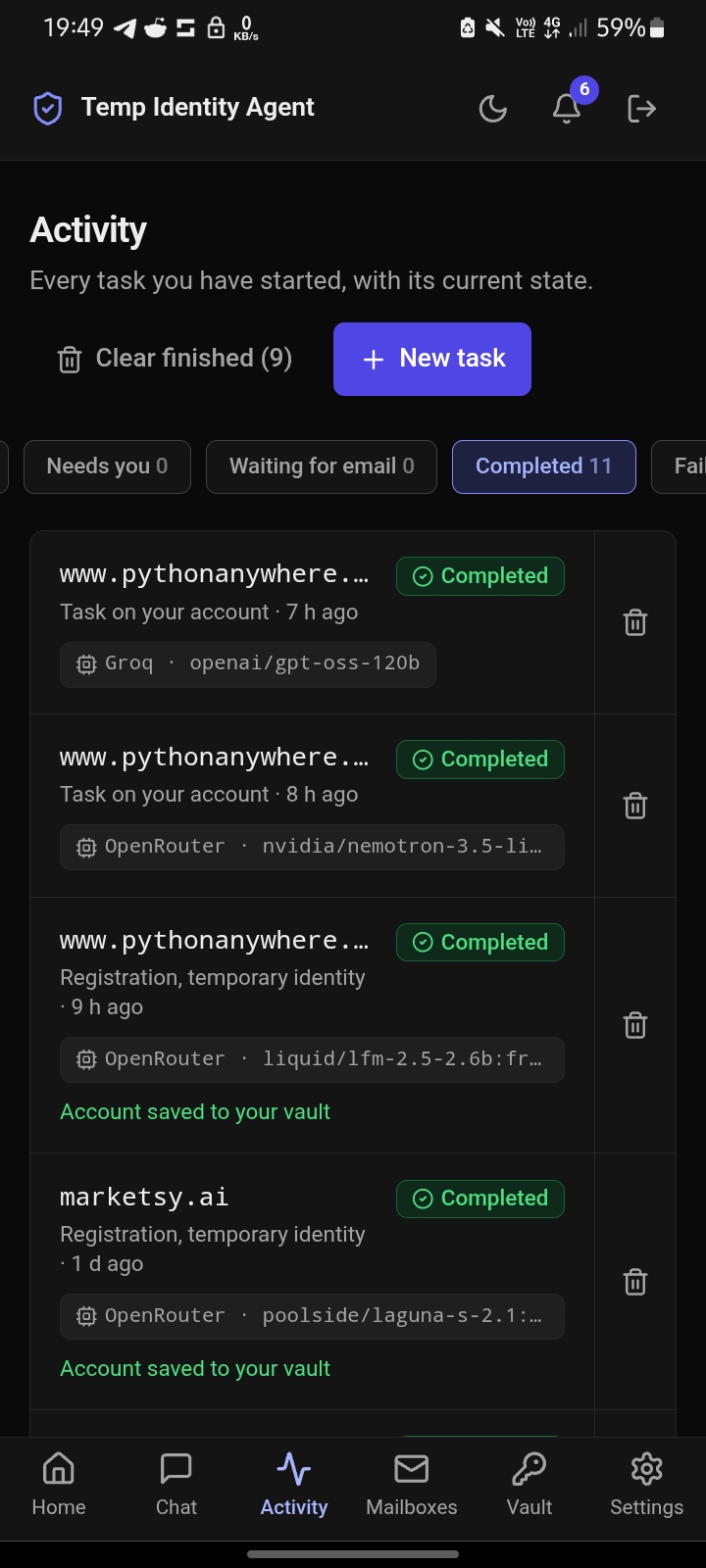
I built this as a self-taught full-stack developer in Nairobi, pairing with an AI coding assistant (Claude) for much of the implementation and debugging. Most of the interesting lessons are in the bug list, so that is where most of this post lives.
Contents
- What it is
- The stack and why
- Architecture
- Local setup, from zero (including Android)
- The build, phase by phase
- The bug catalogue
- Deployment: Render, Vercel, and a VPS worker
- Operations: the commands I actually ran
- Testing
- Security decisions
- Lessons learned
- Limitations and what is next
- Command cheat sheet
What it is
You paste a link. The agent opens a real browser, looks at the page, fills in the sign-up form, reads the verification email, and saves the credentials to a vault.
- Temporary mode (default): a throwaway name, username, strong password and disposable mailbox (mail.tm). Nothing links back to you.
- Permanent mode: your own saved details and your own connected Gmail/IMAP inbox, for accounts you keep.
- Forms: Google Forms, Microsoft Forms, Typeform, Jotform, Tally and similar.
- Chat: talk to the agent about any account, ask it to check the mailbox, or have it do something on the site while you watch.
- MCP server: AI clients such as Claude can call it as a tool.
The hard rule: it never tries to defeat a CAPTCHA or a security check. When it hits one it stops and hands the browser to you, live.
The stack and why
| Layer | Choice | Why |
|---|---|---|
| API | Django 5.1 + Django REST Framework | Mature auth, admin, ORM, migrations; I wanted boring and safe for a system holding secrets |
| Background work | Celery + Redis | A sign-up can take minutes; it must not run inside a web request |
| Browser | Playwright (Chromium) | Real browser, reliable selectors, screenshots for a live view |
| Database | PostgreSQL (Neon in production) | Relational data, transactions, JSON columns |
| Redis | Upstash ( | Managed, TLS, free tier |
| Disposable email | mail.tm API | Programmatic mailboxes, no signup |
| AI | OpenRouter ( | Free models first, fallback when rate-limited |
| Frontend | Next.js 15 (App Router), Tailwind, TypeScript | Deployed on Vercel |
| API hosting | Render (Docker, gunicorn | Easy blueprint deploys |
| Worker hosting | Docker on a VPS | Playwright needs RAM; a VPS is cheaper than a big Render worker |
| Secrets at rest | Fernet ( | Encrypt passwords and mailbox credentials in the database |
Architecture
Browser (Next.js on Vercel)
        |  HTTPS + JWT
        v
Django REST API (Render, gunicorn, 2 workers x 8 threads)
        |                     \
        |                      \--> Server-sent events (notifications, live browser frames)
        v
PostgreSQL (Neon)        Redis (Upstash) <---- Celery beat (periodic jobs)
                              |
                              v
                    Celery worker (Docker on a VPS)
                              |
             +----------------+-----------------+
             v                v                 v
        AgentRunner     Playwright/Chromium    mail.tm / Gmail / IMAP
        (tool loop)     (the real browser)     (verification emails)
             |
             v
     OpenRouter  --(429 / 5xx / timeout)-->  Groq
The core idea is the agent loop. The model never touches the browser or database directly. It can only call a fixed list of tools (the allowlist in
apps/ai_agent/tools.pybrowser.openbrowser.inspectbrowser.clickbrowser.typeidentity.createemail.wait_for_verificationuser.askregistration.mark_completeLocal setup from zero
I started this on an Android phone (Termux + Ubuntu in PRoot) because I did not have a PC available. The same steps work on any Linux box, Mac, or Windows with WSL2.
1. Android only: Termux and Ubuntu
# In Termux
pkg update && pkg upgrade -y
pkg install proot-distro git
proot-distro install ubuntu
proot-distro login ubuntu
# Inside Ubuntu
uname -m            # aarch64 on most phones
apt update && apt upgrade -y
apt install -y git curl wget build-essential python3 python3-pip python3-venv python3-dev
2. Clone and create the virtual environment
git clone <YOUR_REPO_URL>
cd temp-identity-agent/backend
python3 -m venv .venv
source .venv/bin/activate
python -m pip install --upgrade pip
pip install -r requirements/development.txt     # production.txt is the slimmer one used in Docker
3. Environment variables
Create
backend/.envDJANGO_SETTINGS_MODULE=config.settings.development DJANGO_SECRET_KEY=change-me DATABASE_URL=postgres://postgres:postgres@localhost:5432/temp_identity_agent REDIS_URL=redis://localhost:6379/0 CREDENTIAL_ENCRYPTION_KEY=<fernet key, see below> AI_PROVIDER=fallback OPENROUTER_API_KEY=... OPENROUTER_MODEL=openrouter/free GROQ_API_KEY=... EMAIL_PROVIDER=mailtm EMAIL_API_BASE_URL=https://api.mail.tm MAX_AGENT_STEPS=30 MAX_JOB_DURATION_SECONDS=300
Generate the encryption key (do this once and keep it safe; changing it later makes stored secrets unreadable):
python -c "from cryptography.fernet import Fernet; print(Fernet.generate_key().decode())"
4. PostgreSQL
apt install -y postgresql postgresql-contrib
service postgresql start
su postgres -c "psql -c \"ALTER USER postgres PASSWORD 'postgres'\""
su postgres -c "createdb temp_identity_agent"
python manage.py migrate
python manage.py createsuperuser        # or use the ensure_admin command in production
5. Redis
apt install -y redis-server
redis-server --daemonize yes            # on PRoot there is no service manager, start it by hand
redis-cli ping                          # PONG
6. Playwright
playwright install chromium             # the pip package alone does NOT install the browser
# on a real server: playwright install --with-deps chromium
7. Run the three processes
# terminal 1: the API
python manage.py runserver

# terminal 2: the worker (this is where Playwright runs)
celery -A config worker -l info

# terminal 3: periodic jobs
celery -A config beat -l info
8. Frontend
cd ../frontend
npm install
echo "NEXT_PUBLIC_API_URL=http://localhost:8000" > .env.local
npm run dev                              # http://localhost:3000
9. First end-to-end test with curl
curl -X POST http://localhost:8000/api/auth/register/ \
  -H "Content-Type: application/json" \
  -d '{"username":"yoo","email":"me@example.com","password":"a-Strong-pass-123"}'

curl -X POST http://localhost:8000/api/auth/login/ \
  -H "Content-Type: application/json" \
  -d '{"username":"yoo","password":"a-Strong-pass-123"}'      # returns access + refresh JWTs

curl http://localhost:8000/api/me/ -H "Authorization: Bearer <access>"
The three first-run failures every setup hits
| Symptom | Cause | Fix |
|---|---|---|
| Redis was installed but not running (PRoot has no service manager) | |
| Python Playwright package installed, Chromium not | |
| Django ORM called while Playwright's sync API had an event loop running | see bug 3 |
The build, phase by phase
Phase 0: the scaffold (August)
The first commit was a complete skeleton built in 13 phases: security utilities (Fernet encryption, SSRF protection), JWT auth, the identities app (name/username/password generators), the email service (mail.tm provider, verification link and OTP extraction), the Playwright browser layer (a page inspector that returns structured, element-ID'd snapshots), the AI agent loop with a strict tool allowlist, the registration orchestration (states, quotas, domain policies), and the vault. It shipped with 75 tests and six local mock sites (simple sign-up, email verification, multi-step, failing, CAPTCHA, hostile page) so I never had to test against real sites.
Phase 1: making it deployable (16 October)
Commits: Update the project for production, fixing old dependencies failures, updating docker start command, Fix base.py.
- Split requirements into
anddevelopment.txt
and fixed stale pins that broke the Docker build.production.txt - Wrote
(Python 3.12 slim plus the Chromium system libraries, thendocker/Dockerfile.backend
, then a non-rootplaywright install chromium
).appuser - Wrote
, a blueprint for three services: web (gunicorn), worker, and beat.render.yaml
Phase 2: choosing an AI provider (16 October)
I replaced my first provider with OpenRouter (
) as primary and Groq as an automatic fallback. A openrouter/free
FallbackAIProviderPhase 3: usability (17 October)
Job retry and delete, human-readable step descriptions (no secrets), the model name shown on each job, a navigation redesign, and a resume fix. Then the big one: the live browser view. When the agent hits a CAPTCHA the worker keeps its browser open, streams screenshots about once a second over the API, accepts clicks and keystrokes from you, and continues in the same browser when you finish.
Then Settings (account type, saved details, connected email), agent questions (
user.askPhase 4: integrations (18 October)
- Connected Google/Microsoft accounts for forms that need a sign-in. The agent can sign in as the dedicated account you connect, and never sees the password.
- OAuth for MCP clients, so Claude.ai can add it as a custom connector.
- Per-job budgets from
andMAX_AGENT_STEPS
.MAX_JOB_DURATION_SECONDS
Phase 5: hardening and operations (18-19 October)
DB connection resilience, a Django admin that hides secrets and is read-only where it matters, an
ensure_adminPhase 6: the features that made it feel like a product (19-20 October)
- Notifications: server-sent events plus REST, for job events, new mail and expiring accounts.
- Vault mailbox: list and read messages, see the extracted code or link, and ask the agent about the mailbox.
- Site playbooks: when a sign-up succeeds, the steps are recorded. Next time the same site is replayed in plain code with no AI calls, and the AI takes over only for the part that changes (the verification email).
- Manual sign-up kit: when a CAPTCHA blocks the agent, it hands you everything it would have typed so you can paste it into the site yourself and save the result.
- Moved gunicorn to
so long-lived SSE connections do not exhaust workers.--worker-class gthread --threads 8
Phase 7: chat (21-22 October)
I wanted to talk to the agent after a job finished. It went through four steps:
- Account chat: a chat panel on each vault account. The assistant can list and read the mailbox, change saved details, or run a task on the website.
- Standalone Chat page: every vault account is a conversation, like the history list in ChatGPT or Claude.
- General chats ("New chat"): a conversation started the same way a task is started. Paste a bare URL and it starts a task directly; describe what you want and the assistant starts one for you.
- Inline task progress: the job's activity appears inside the chat as a collapsible block (steps, questions, CAPTCHA hand-off, cancel, copy link) like the tool-call blocks in Claude.ai. The Activity page stays as the full detail view.
Phase 8: production reality (22-25 October)
Everything after the first real deployments was bug fixing driven by real logs. That is the next section.
The bug catalogue
Every real failure, with symptom, cause and fix. This is the part I would have wanted to read before starting.
1. Redis connection refused locally
Symptom:
Error 111 connecting to localhost:6379redis-server --daemonize yesredis-cli ping2. Playwright browser missing
Symptom:
BrowserType.launch: Executable doesn't exist at ... headless_shellpip install playwrightplaywright install chromium--with-deps3. SynchronousOnlyOperation
in Celery workers
SynchronousOnlyOperationSymptom: Django ORM calls failed inside the Playwright session with "You cannot call this from an async context". Cause: Playwright's sync API runs an event loop on the thread; Django detects it and blocks ORM access. Fix: Allow the ORM in the worker's Playwright sessions (commit Allow Django ORM inside Playwright sync sessions in Celery workers). Isolating DB work from the browser thread is the cleaner long-term answer.
4. Tool names rejected by OpenAI-compatible APIs
Symptom: 400 errors; tool calls to names like
browser.open[A-Za-z0-9_-]user__askuser5. Groq 400 tool_use_failed
400 tool_use_failedSymptom: Groq rejected whole requests. Cause 1: Optional tool arguments were sent as
null6. Groq model not available to the key
Symptom: 404 for the configured model. Fix:
GROQ_MODEL=""7. "SSL connection has been closed unexpectedly"
Symptom: Jobs died mid-run, or the first query of a new job failed. Cause: An agent job sits idle in the database for a long time (LLM calls, page loads, waiting for a human). Managed Postgres closes idle connections. Fix, in layers: an
ensure_db_connection()CONN_HEALTH_CHECKS8. Job list polling hit the rate limiter
Symptom: The dashboard started failing with 429s. Cause: The throttle scope for job creation was applied to the whole job view, including the list the dashboard polls every few seconds. Fix: throttle only job creation (commit Only throttle job creation, not the job list the dashboard polls).
9. MCP clients got 406
Symptom: A client sending
Accept: text/event-stream406 Not Acceptable10. Verification emails failing: links too long for the column
Symptom: Sign-ups stalled at the verification step; the worker raised
value too long for type character varying(200)URLFieldextracted_linkURLField(max_length=2000)11. "Job completed" but nothing in the vault
Symptom: The worker said the credentials were saved; the vault was empty and the mailbox showed nothing. Cause: The model called
form.completeform.completeregistration.mark_completeensure_vault_accountbackfill_vault_accounts12. Render deploy: "no Migration class"
Symptom: Deploy failed while migrating the notifications app. Cause: A truncated copy-paste of
notifications/migrations/0001_initial.pygit diff13. Vercel build failed after the chat refactor
Symptom:
'"@/lib/api"' has no exported member named 'AccountChat'AccountChat.tsxConversationgit rm frontend/components/vault/AccountChat.tsx14. VPS worker crash loop: "No space left on device"
Symptom: The worker restarted forever; jobs stayed queued. Cause: Every
docker buildjson-filedocker system df # see where the space went docker image prune -af # reclaimed 26 GB truncate -s 0 $(docker inspect --format='{{.LogPath}}' tia-worker)
And to prevent it, log rotation in
/etc/docker/daemon.json{ "log-driver": "json-file", "log-opts": { "max-size": "10m", "max-file": "3" } }
15. Account tasks failed with "social sign-in only"
Symptom: After a successful sign-up, asking the chat to do something on the site made a new job that failed with "This site doesn't offer sign-up or login with an email and password". Cause: The task started from the site's home page. A very small free model (2.6B parameters) did not see an email form, called
site.report_auth_methods16. Jobs stuck on "Starting" forever
Symptom: A job showed "Starting - The agent is getting ready" for many minutes. Cause, from the worker log, in order: OpenRouter returned
429 free-models-per-dayTemporary failure in name resolutionConnection closed by server
retries DB writes (dropping the dead connection, short back-off) so failures are always recorded.retry_db()- A beat task,
, runs every 2 minutes and marks any running job with no activity past its time budget as failed with a clear message.fail_stalled_registration_jobs - The AI fallback now skips the primary for an hour once it reports its daily quota is gone.
- One automatic retry on timeouts and network errors.
- Friendlier error text for quota problems.
17. Upstash resets idle Redis connections
Symptom:
consumer: Connection to broker lost. Trying to re-establish the connection...ConnectionResetError: [Errno 104]poll_mailboxeshealth_check_intervalretry_on_timeoutCELERY_TASK_IGNORE_RESULT = Trueexpires: 5518. SMS code treated as a CAPTCHA
Symptom: On a site that asks for a phone number first, the agent typed the number, then gave up when the site asked for the texted code, saying it "requires CAPTCHA". Cause: My own system prompt listed "SMS verification" next to CAPTCHA and KYC under "never attempt". The agent obeyed me. Fix: a code sent to the user's own phone is not a bypass. The prompt now tells the agent to ask the user (
user.asksms_codesmsotp2fa19. Generated usernames rejected by sites
Symptom: A site said "username can only contain letters and numbers" (my generator made
first.last4821identity.update_usernameusername20. The vault password turned into the word "null"
Symptom: Revealing a password showed
nullpassword"null"nullnonen/a21. "Forgot password" stopped halfway
Symptom: The agent clicked Forgot password and called the task complete without reading the reset email. Fix: a real reset flow: request the email, wait for it, open the link, call
identity.propose_passwordidentity.commit_password22. One notification and one inbox per site for permanent accounts
Symptom: With a connected Gmail, every permanent account had its own mailbox view, so the same email appeared in several places and triggered several notifications. Fix: one connected inbox: every task's mailbox rolls up into a single list (each Gmail message once, tagged with the site it is probably about), one notification per email, a single "Check now", an assistant that reads the combined inbox, and a mute switch (no background checks and no notifications; the agent still reads it while a task runs). Disposable mailboxes for temporary identities stay isolated, one per account.
Deployment
Services
| Piece | Where | Notes |
|---|---|---|
| Frontend | Vercel | |
| API | Render (Docker) | gunicorn, |
| Celery worker | VPS (Docker) | |
| Celery beat | VPS (Docker) | exactly one beat, ever |
| Postgres | Neon | |
| Redis | Upstash | |
Render
render.yamlsync: falsepython manage.py migrate --noinput python manage.py backfill_vault_accounts python manage.py ensure_admin python manage.py collectstatic --noinput gunicorn config.wsgi:application --bind 0.0.0.0:$PORT --workers 2 --worker-class gthread --threads 8 --timeout 120
Required environment variables:
DJANGO_SETTINGS_MODULE=config.settings.productionDJANGO_DEBUG=FalseDJANGO_SECRET_KEYDJANGO_ALLOWED_HOSTSDATABASE_URLREDIS_URLCORS_ALLOWED_ORIGINShttps://CREDENTIAL_ENCRYPTION_KEYAI_PROVIDER=fallbackOPENROUTER_API_KEYGROQ_API_KEYEMAIL_PROVIDER=mailtmREQUIREMENTS_FILE=production.txtVercel
Import the repo, set the root directory to
frontendNEXT_PUBLIC_API_URL=https://<your-api>.onrender.commainnext buildThe VPS worker
cd /opt/temp-identity-agent
git pull

docker stop tia-worker tia-beat
docker rm tia-worker tia-beat

docker build -f docker/Dockerfile.backend \
  --build-arg REQUIREMENTS_FILE=production.txt \
  -t tia-backend:prod .

docker run -d --name tia-worker --restart unless-stopped --env-file .env \
  tia-backend:prod celery -A config worker -l info --concurrency=1

docker run -d --name tia-beat --restart unless-stopped --env-file .env \
  tia-backend:prod celery -A config beat -l info

docker logs -f tia-worker
Every code change that touches the agent, the tools or the prompts needs this rebuild, because the worker is what runs the agent.
Operations
Commands I reached for while debugging production:
# Is the worker alive, and what is it doing?
docker ps
docker logs --tail 200 tia-worker
docker logs -f tia-beat

# Disk, the silent killer
df -h
docker system df
docker image prune -af
docker builder prune -af

# Jobs stuck? Look from Django
python manage.py shell -c "
from apps.registration.models import RegistrationJob as J
print(J.objects.exclude(state__in=['completed','failed','cancelled','expired']).values_list('id','state','updated_at'))"

# Repair completed jobs that have no vault entry
python manage.py backfill_vault_accounts

# Create or update the admin from environment variables
python manage.py ensure_admin
Testing
- Backend:
went from 75 tests at the first commit to 433 now, onecd backend && python -m pytest
package per app. It covers the security boundary (the dispatcher rejects anything not on the allowlist), prompt-injection inertness, the fallback provider, orchestration limits, the vault never leaking passwords, chat privacy (the model never sees the password), the inbox rollup and mute.tests/ - Frontend:
andnpx tsc --noEmit
, plus Playwright screenshots against a mocked API to check layouts at phone width.npx eslint app components lib --max-warnings=0 - Mock sites: six local fixtures, served by
. I never test against real production sign-up pages.tests/fixtures/serve_mock_sites.py
Two things that bit me in testing:
readspytest
fromDATABASE_URL
. Mine pointed at the real Neon database. Always override it for a test run:.env
.DATABASE_URL=postgres://postgres:postgres@localhost:5432/temp_identity_agent python -m pytest- Throttle counters live in the cache and persist between tests. A fixture resets them, otherwise tests fail with 429s depending on order.
Security decisions
- The model never sees secrets it does not need. It receives the identity's password only to type into the site's own form. In chat it never sees the password at all.
- Everything from a page or an email is untrusted data. Prompts say so, tools return emails wrapped as "untrusted", and the mailbox assistant gets no tools at all, so a hostile email can only change the wording of an answer.
- Allowlist, not blocklist. If a tool is not in the registry, the agent cannot call it, structurally.
- SSRF protection on every URL (no localhost, private, link-local or cloud-metadata addresses), re-checked on every request the live browser makes.
- Encryption at rest with Fernet for passwords, mailbox credentials, and the OAuth tokens.
- Audit log for every credential reveal, email connection change, and agent-initiated password change.
- Never defeat a human check. CAPTCHAs, KYC and similar are handed to the person, live.
- Permanent mode reads only mail that arrives after a task starts, never the existing inbox.
Lessons learned
- Free models are great and unreliable. Design for the weakest model you might get: schemas that tolerate
, retries for malformed calls, and refuse-with-explanation errors that tell the model what to do instead.null - Never let a model choose a value you will persist. The "null" password came from trusting an optional tool argument. Require the value to come from the user's own words.
- Your own prompt is a bug source. The SMS-as-CAPTCHA failure was my instruction, followed correctly.
- Make failure writable. The worst bug was a job that could not record that it had failed. Retry the failure path harder than the happy path, and run a reaper for anything that still slips through.
- Managed services close idle connections. Keepalives, health checks, fresh connections per task, and no stored results where you do not need them.
- Watch the disk. Docker images that contain a browser are huge, and logs are unbounded by default.
- A copy-pasted file is not a deploy. Diff it. Truncation produces confusing errors far from the cause.
- Safety nets beat perfect prompts. The vault-entry fix and the username sync both exist because a model will sometimes do the wrong thing.
Limitations and what is next
- Small free models make mistakes on complicated sites. A stronger model for the tool-calling step would help more than any prompt change.
- Each task starts a fresh browser and signs in again; saving the logged-in session per account would remove that.
- SMS codes and CAPTCHAs still need you. That is by design.
- The agent does not remember across tasks except through the background it is given and the playbooks it records.
- Next: slower mailbox polling to stay inside free-tier limits, per-site playbook sharing, and a stronger default model.
Command cheat sheet
# Local
source .venv/bin/activate
python manage.py migrate
python manage.py runserver
celery -A config worker -l info
celery -A config beat -l info
playwright install chromium
python manage.py makemigrations --check --dry-run

# Tests
DATABASE_URL=postgres://postgres:postgres@localhost:5432/temp_identity_agent python -m pytest -q
npx tsc --noEmit && npx eslint app components lib --max-warnings=0

# Production worker
docker build -f docker/Dockerfile.backend --build-arg REQUIREMENTS_FILE=production.txt -t tia-backend:prod .
docker run -d --name tia-worker --restart unless-stopped --env-file .env tia-backend:prod celery -A config worker -l info --concurrency=1
docker run -d --name tia-beat   --restart unless-stopped --env-file .env tia-backend:prod celery -A config beat -l info
docker logs -f tia-worker

# Housekeeping
docker system df && docker image prune -af
python -c "from cryptography.fernet import Fernet; print(Fernet.generate_key().decode())"
Responsible use: Login Direct is for legitimate testing, research and personal privacy. Respect each site's terms of service, and never use it to evade a site's anti-abuse systems. It is designed not to.